
Morse Code Translator – Text to Morse & Morse to Text
Free Morse code translator: convert text to Morse code or decode Morse to text instantly. Audio beep playback, light signal mode, typing trainer, and flashcards. No signup needed.
Free Morse code translator: convert text to Morse code or decode Morse to text instantly. Audio beep playback, light signal mode, typing trainer, and flashcards. No signup needed.
This free Morse code translator converts text to Morse code and decodes Morse code back to text no signup, no download, no delay. Type or paste any message and the translation appears as you type, complete with audio beeps, blinking light signals, and adjustable speed settings.
Whether you need to translate a message for a school project, practice for an amateur radio exam, decode a mystery signal, or simply learn the Morse code alphabet, this tool handles all of it in one place. All 26 letters, 10 digits, and common punctuation marks are supported using the international ITU standard..
This Morse code translator is a complete system for translating, learning, and practicing Morse code online:
Text to Morse Code
Input (Text) | Output (Morse) |
|---|---|
HELLO | •••• • •—•• •—•• ——— |
••• ——— ••• |
Morse Code to Text (Decoding)
This tool simplifies the decoding process. You can paste dot dash signals, follow simple spacing rules, and the real-time system converts everything into text instantly.
How to Input Morse
Live Decoding Example
Morse Input | Decoded Text |
|---|---|
— • — • • • | CODE |
•— •-•• •—•• ——— | ALLO |
What You Get
- Clean output from any morse code sentence
- Accurate decoding using correct spacing rules
- Instant result powered by a real-time system
Step 1 — Choose your translation direction
At the top of the tool, select Text → Morse or Morse → Text. The tool defaults to Text → Morse; toggle it to switch directions at any time.
Step 2 — Type or paste your input
For Text → Morse, type any message using letters (A–Z), numbers (0–9), spaces, and common punctuation. For Morse → Text, type dots (.) and dashes (-) with a single space between letters and a forward slash (/) between words — for example: …. . .-.. .-.. — / .– — .-. .-.. -..
Step 3 — Read the output
Your translation appears in the output box as you type, with no button to press. Each character is converted using the ITU international standard — the same system used in aviation and amateur radio.
Step 4 — Play the audio signal
Click the speaker icon to hear your Morse code as beep tones — a dot is a short beep (1 unit), a dash is a long beep (3 units). Use the WPM slider to adjust speed; start at 5–10 WPM as a beginner and work up to 20+ WPM with practice.
Step 5 — Use light, copy, or share
Enable Light Mode to see the signal as screen flashes instead of audio. Use Copy to copy your output, or Share to send it. Both the Morse and the decoded text can be copied independently.
Step 6 — Practice with the trainer or flashcards
Switch to Trainer Mode to receive a signal and type what you decode. Use Flashcard Mode to test your memory of individual letters and numbers.
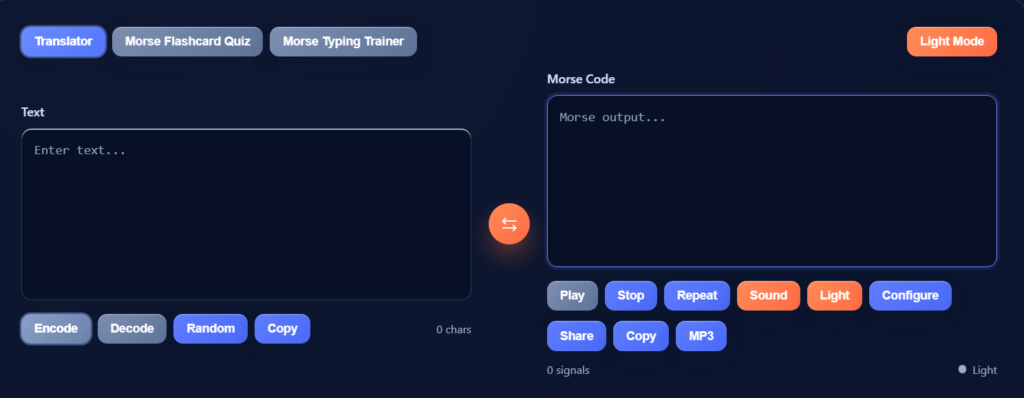
1. Text to Morse Conversion
Type any message and each character is immediately encoded into its corresponding Morse pattern. The tool uses the ITU international standard — the same system used by amateur radio operators, military forces, and aviation navigators worldwide. Letters, numbers (0–9), and common punctuation all have unique patterns. Output shows both the dot-dash notation (· — · ·) and the traditional text notation (.- -… etc.), so you can use whichever format you need.
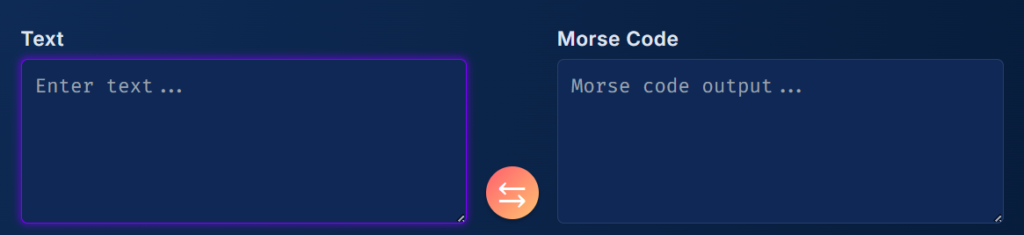
2. Morse to Text Decoder
Paste or type any Morse sequence and the decoder converts it back to readable text in real time. The correct input format is: use a period (.) for dots and a hyphen (-) for dashes, with one space between each letter and a forward slash (/) between words. The decoder handles all 26 letters, 10 digits, and common punctuation. If you make a spacing error, the decoder flags it so you know exactly where the problem is rather than giving a silent wrong answer.

3. Audio Playback (Beep Sound)
Press play to hear your Morse code as real audio signals. Short beeps represent dots and long beeps represent dashes, following the precise ITU timing ratios (a dash is exactly 3x the length of a dot). You can control playback speed from 1 to 40 WPM using the speed slider. Slower speeds let you hear each element clearly ideal when you are just starting.
Higher speeds train your ear to recognize full letter patterns as a single sound, which is how experienced operators actually decode Morse.For advanced audio decoding, try our Morse code audio translator.
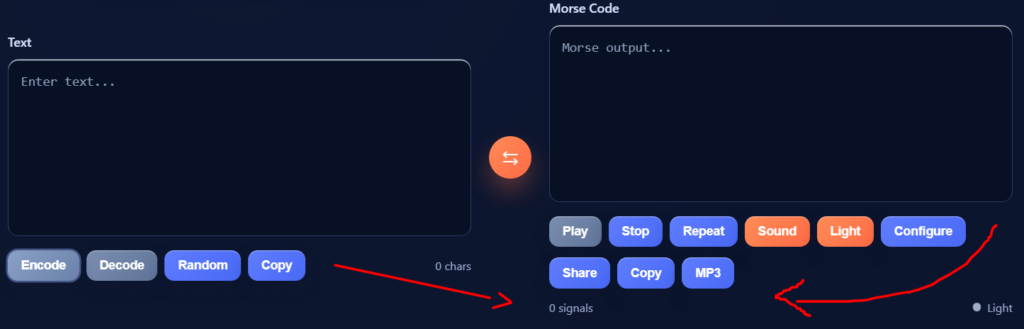
4. Light Signal Mode
Enable light mode and your screen becomes a visual Morse transmitter. The display flashes the correct pattern for each letter a brief flash for a dot, a longer flash for a dash with accurate timing between elements. This mirrors how Morse code is sent using a flashlight or signal lamp. It is particularly useful for learning to read Morse visually rather than just acoustically, and for practicing the kind of light signaling used in maritime distress situations.
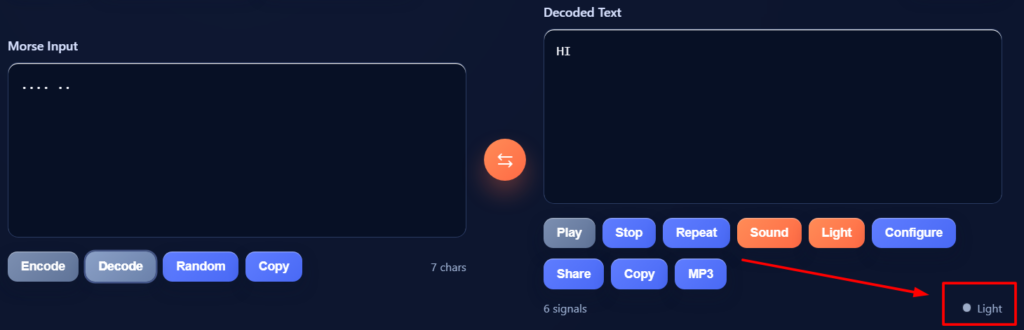
5. Random Message Generator
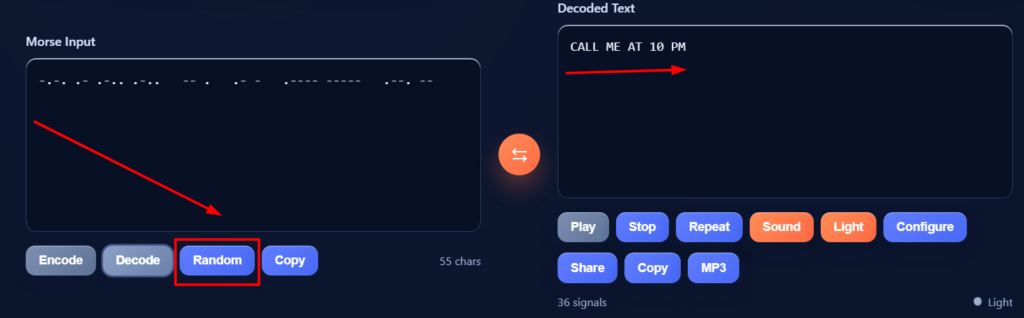
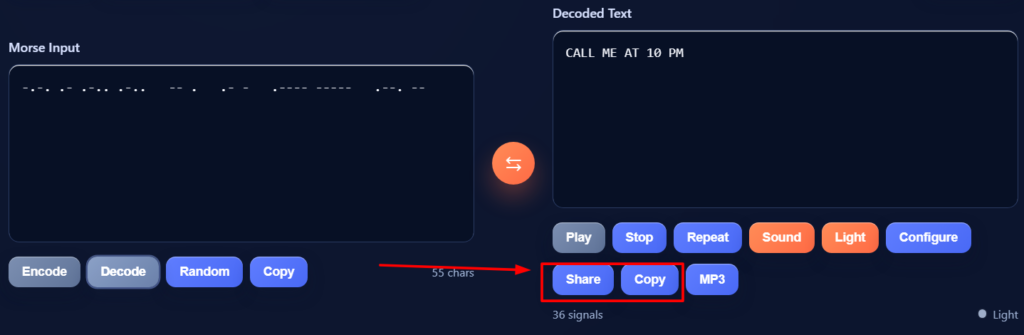
6. Copy and Share
Copy either the Morse output or the decoded text with a single click no selecting text manually. The share button lets you send the result directly via any sharing method your device supports (SMS, email, social media, clipboard). This makes it easy to send secret messages, share Morse practice challenges with friends, or export results to a logbook.
7. Typing Trainer Mode
The trainer sends you a Morse audio signal and waits for you to type the letter you decoded. It scores your accuracy and speed, tracks your progress letter-by-letter, and highlights which characters you find hardest. This is the Koch method of Morse training proven to be the fastest way to reach copy speeds of 20+ WPM and it is the exact method used to train licensed amateur radio operators.
8. Flashcard Mode
Flashcard mode presents you with either a letter (and asks for the Morse) or a Morse pattern (and asks for the letter). You can set it to test only letters, only numbers, or both. The spaced-repetition system shows you the characters you keep getting wrong more often, which is the most efficient way to memorize the full alphabet without grinding through every letter equally.
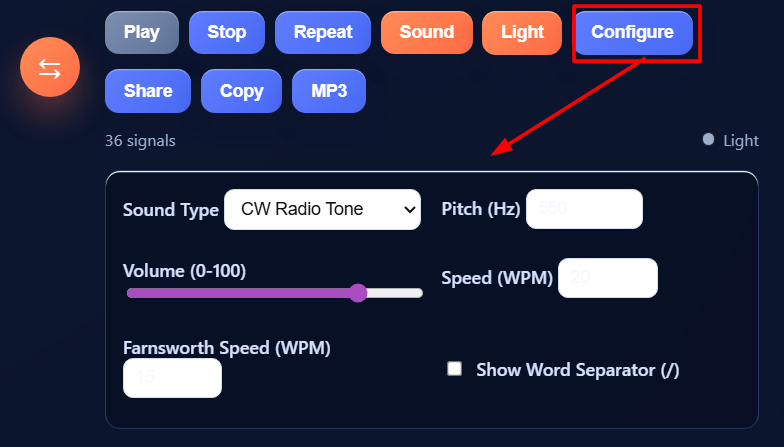
9. Advanced Sound Settings (WPM, Farnsworth, Pitch, Volume)
The advanced settings panel gives you full control over how Morse sounds. WPM controls the overall speed. Farnsworth spacing keeps the character speed high while slowing the gaps between characters this teaches your brain to hear each letter as a sound unit rather than counting individual dots and dashes. Pitch control adjusts the tone frequency (standard is around 600–800 Hz). Volume sets the output level. These settings let you precisely match the conditions of any Morse exam or on-air operation.
10. Real-Time Character & Signal Counters
As you type, the tool displays a live count of characters entered and Morse elements generated (total dots + dashes). These counters help you track message length for applications like amateur radio operations where message length matters, or for practice sessions where you want to measure your output rate per minute.
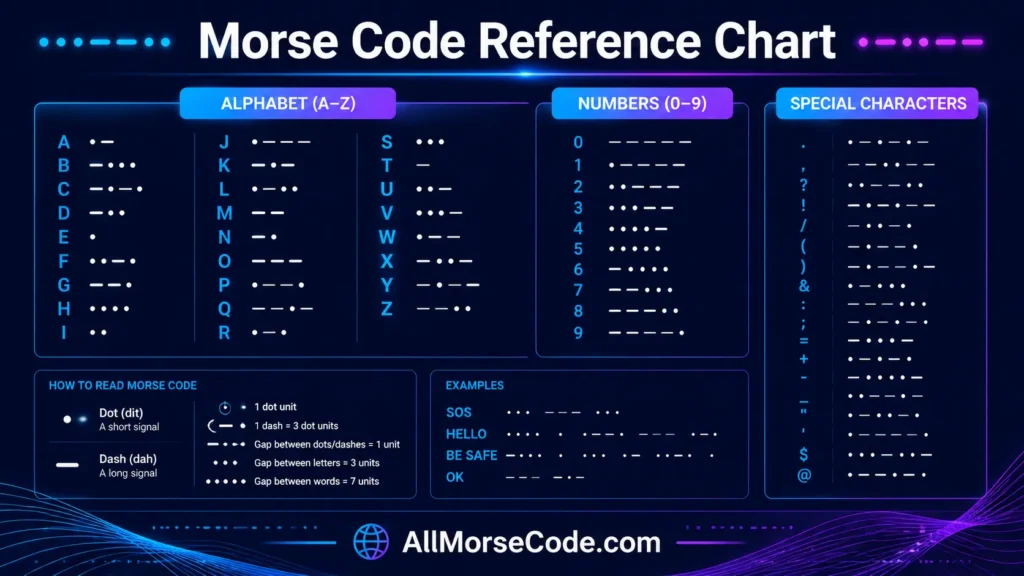
Quick reference for the most common letters:
Letter | Morse Code | Letter | Morse Code |
|---|---|---|---|
A | ·— | H | ···· |
E | · | S | ··· |
O | ——— | T | — |
Want the complete chart? See the full Morse code alphabet, numbers & symbols chart includes frequency logic, spacing rules, and a free printable PDF.
Morse code is a communication system that represents letters, numbers, and punctuation as sequences of short and long signals called dots and dashes. A dot is a brief signal (one unit long) and a dash is a sustained signal (three units long). Gaps between elements, letters, and words follow specific timing rules that make the code universally readable.
The system was developed in the 1830s and 1840s by Samuel F. B. Morse and Alfred Vail to work with the electric telegraph the first technology to send messages over long distances in seconds rather than days. Before Morse code, messages traveled only as fast as a horse could carry them; after it, a single operator could transmit a news story from New York to Washington in minutes.
The international version of Morse code (ITU standard) was standardized in 1865 and is the version used globally today, including by this translator. It differs slightly from the original American Morse code — the international version is cleaner, more consistent, and what all modern amateur radio and aviation systems use.
Morse code signals can be sent through any medium that can switch between two states: electrical current on a wire, sound (beeps vs. silence), light (flashes vs. dark), or even taps on a surface. This flexibility is why Morse code has survived for nearly 200 years and is still actively used in aviation navigation beacons (VOR and NDB stations still broadcast their identifiers in Morse), amateur (ham) radio, and as an accessibility communication tool for people with limited mobility. For a full deep-dive into the history, alphabet, and how to learn Morse code from scratch, see our complete What Is Morse Code guide.
Popular phrases like SOS in Morse code, hello in Morse code, hi in Morse code, Help in Morse Code, I love you in Morse code, I Miss you in Morse Code, Be safe in Morse Code, yes in Morse code , No in Morse code, Happy birthday in Morse code, Good Morning in Morse Code and Good bye in Morse code are among the most searched Morse patterns.
There are two main versions of Morse code: International Morse Code (ITU standard) and the original American Morse Code (also called Railroad Morse).
International Morse Code was standardized by the International Telegraph Conference in Paris in 1865 and later formalized by the ITU in Recommendation M.1677-1. It assigns a consistent dot-dash pattern to the 26 letters of the Latin alphabet, 10 digits, and punctuation marks. This is the version used worldwide today in amateur radio, aviation, maritime communication, and all modern digital tools including this translator.
American Morse Code was the original system developed by Samuel Morse for the U.S. telegraph network in the 1840s. It used internal spaces within letters, two different dash lengths, and some characters with no equivalent in International Morse. While it worked well on American telegraph lines, it was incompatible with European systems and was never standardized internationally.
American Morse is now obsolete and not used in any active communication system. This translator uses the International (ITU) standard exclusively the correct standard for amateur radio exams, aviation training, and emergency signaling.
Despite being invented in the 1830s, Morse code is actively used in several fields today not as a nostalgic curiosity, but as a genuinely practical communication method
Aviation and Navigation
VOR (VHF Omnidirectional Range) and NDB (Non-Directional Beacon) navigation stations still broadcast their station identifiers as Morse code on their carrier frequencies. Pilots identify which ground station they are receiving by listening for the two- or three-letter Morse identifier — a skill still taught in instrument navigation training today.
Amateur (Ham) Radio
Amateur radio has the largest active community of Morse code users. While the international Morse proficiency requirement for radio licenses was dropped in 2003, millions of ham operators still use CW (continuous wave Morse) because it cuts through interference better than voice, requires simpler equipment, and can reach farther distances with lower power. Many operators describe Morse as the most satisfying mode of communication in the hobby.
Emergency and SOS Signaling
The SOS distress signal (··· — ···) remains the internationally recognized emergency signal under International Telecommunication Union regulations. It can be transmitted by any means flashlight flashes, mirror reflections, sound blasts, or radio — making it usable even when powered communication devices have failed. Survival training courses and wilderness safety programs still teach SOS signaling for exactly this reason.
Accessibility Communication (AAC)
Morse code is used as an augmentative and alternative communication (AAC) method for people with severe physical disabilities. Google, Microsoft, and Apple have all built Morse code input into their accessibility platforms. A single-switch or dual-switch input device or even blinking and eye movements can be used to type Morse code characters, giving users with conditions like ALS, locked-in syndrome, or severe cerebral palsy a way to communicate digitally.
Military and Security Applications
Military forces continue to train in Morse code for situations where electronic systems fail or are jammed. Morse requires no encryption hardware to be secret the message is already unintelligible to anyone who doesn’t know the code. Special operations forces, intelligence services, and maritime units maintain Morse capability as a backup communication system.
Games, Puzzles, and Pop Culture
Morse code appears frequently in escape rooms, puzzle hunts, video games, TV shows, and alternate reality games (ARGs). Hidden Morse messages are embedded in everything from movie soundtracks to corporate logos. Learning to read Morse code unlocks a surprisingly large number of cultural references and puzzle opportunities.
For read and write morse code, we need to learn dots and dashed first because these are the core elements for morse code learning.
Understanding Dots and Dashes
Think of Morse code like short and long signals.
Example:
This makes it easier to see patterns instead of memorizing everything.
Morse Code Spacing Rules
The spacing system helps you understand where letters and words start and end.
Example:
Without the right spacing system, the message can look mixed up.
Element | Duration | Example |
|---|---|---|
Dot (·) | 1 unit | E = · (one unit) |
Dash (–) | 3 units | T = – (three units) |
Gap between elements (within a letter) | 1 unit | A = ·– (1 unit dot + 1 unit gap + 3 unit dash) |
Gap between letters | 3 units | HI = ···· ·· (3 unit gap between H and I) |
Gap between words | 7 units | HI / THERE (7 unit gap at the / symbol) |
This timing system is defined by the ITU (International Telecommunication Union) in Recommendation M.1677-1. The “unit” is a relative measure at 5 WPM, one unit is about 240 milliseconds. At 20 WPM, one unit is about 60 milliseconds. The ratio between elements always stays the same regardless of speed, which is why Morse code remains readable at any pace.
Encoding and Decoding Messages
This is how you write and read Morse step by step
To Encode (Text → Morse):
Example:
To Decode (Morse → Text):
This simple method helps you understand and send messages clearly.
Learning Morse code becomes easy when you focus on rhythm patterns instead of memorizing each symbol. Think of it like listening to beats. Each letter has its own sound pattern, and your brain learns it faster through recognition.
Simple Way to Understand Rhythm
Signal Type | Meaning | How It Feels |
|---|---|---|
Dot (•) | Short signal | quick tap |
Dash (—) | Long signal | longer hold |
Gap | Pause | small break |
This is where signal timing matters. Every signal follows a fixed pattern, so your brain starts to recognize it like a rhythm.
Why Rhythm Works Better Than Memorizing
Example (Feel the Pattern)
Letter | Morse | Rhythm Pattern |
|---|---|---|
E | • | quick |
T | — | long |
A | • — | short + long |
S | • • • | quick quick quick |
O | — — — | long long long |
Each letter has a unique rhythm pattern. When you practice, you start to “hear” the word instead of reading it.
Key Idea to Remember
Once you get used to the rhythm, Morse code feels natural and much easier to understand.
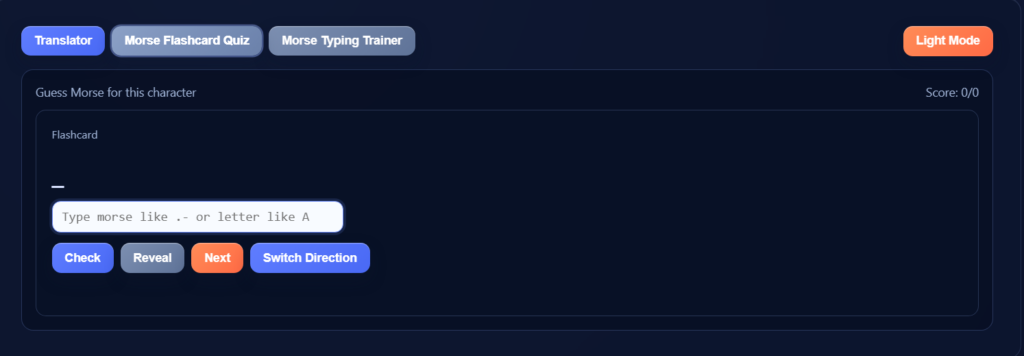
Learning Morse becomes easier with the right practice tools. The built-in typing trainer sends you real signals — you see a prompt, type the Morse, and get instant feedback. Flashcards reinforce pattern recognition by showing letters and their codes (or the reverse), so you build recall systematically rather than by guesswork.
The system also tracks your progress: accuracy tracking shows where you’re making mistakes, and speed tracking shows how your reading and typing speed improves over time — helping you build confidence without second-guessing yourself.
Morse code flashcard practice mode showing letter and pattern
Feature | Basic Tools | This Tool |
|---|---|---|
Audio | Limited | Full |
Light | No | Yes |
Practice | No | Yes |
Control | Basic | Advanced |
There are dozens of Morse code tools online. Here’s what makes this one different:
A good Morse code translator should be simple, fast, and easy to use. This tool updates your translation as you type, so you can switch between text-to-Morse and Morse-to-text without delay, using correct signal patterns for accurate results every time.
With audio signals, light mode, and built-in practice tools, it becomes more than a converter — it helps you learn, test, and improve using one complete system. Whether you’re a beginner or practicing advanced skills, this tool gives you everything you need in one place.

Steve Johnson
Founder of AllMorseCode.com and creator of educational Morse code resources used by learners worldwide. Specializes in Morse code translation, signal encoding concepts, communication history, and practical learning methods. Publishes in-depth guides, reference materials, and interactive tools that make Morse code simple, accurate, and accessible for students, amateur radio enthusiasts, emergency preparedness learners, and everyday users.