
Morse Code Audio Translator: Decode Morse Audio to Text Online
Decode Morse code audio from WAV, MP3, and OGG files instantly. Use live microphone input, adaptive speed detection, and convert Morse audio to text online for free.
For anyone who has ever tried to decode a Morse code recording, The experience can quickly become frustrating. You might have a WAV file from a radio transmission, an MP3 recording from a training exercise, or an OGG file containing a Morse signal, yet turning those dots and dashes into readable text isn’t always easy. If you are new to Morse code, start with our free Morse code translator or read our guide on what is Morse code.
This free Morse Code Audio Translator solves that problem by automatically converting Morse audio to text online from WAV, MP3, and OGG recordings. Using adaptive speed detection, signal processing, and real-time audio analysis, the tool can identify Morse code patterns, recognize dots and dashes, and display readable text within seconds.
A Morse Code Audio translator is a tool that listens to Morse code tones and translates them into readable characters. Instead of manually identifying each dot, dash, and spacing interval, the decoder analyzes the audio waveform, detects Morse timing patterns, and converts the signal into text automatically.
Traditional Morse code communication relies on a series of short and long signals, commonly called dits and dahs. These signals can be transmitted through radio communications, audio recordings, training exercises, emergency signaling systems, or software-generated Morse tones.
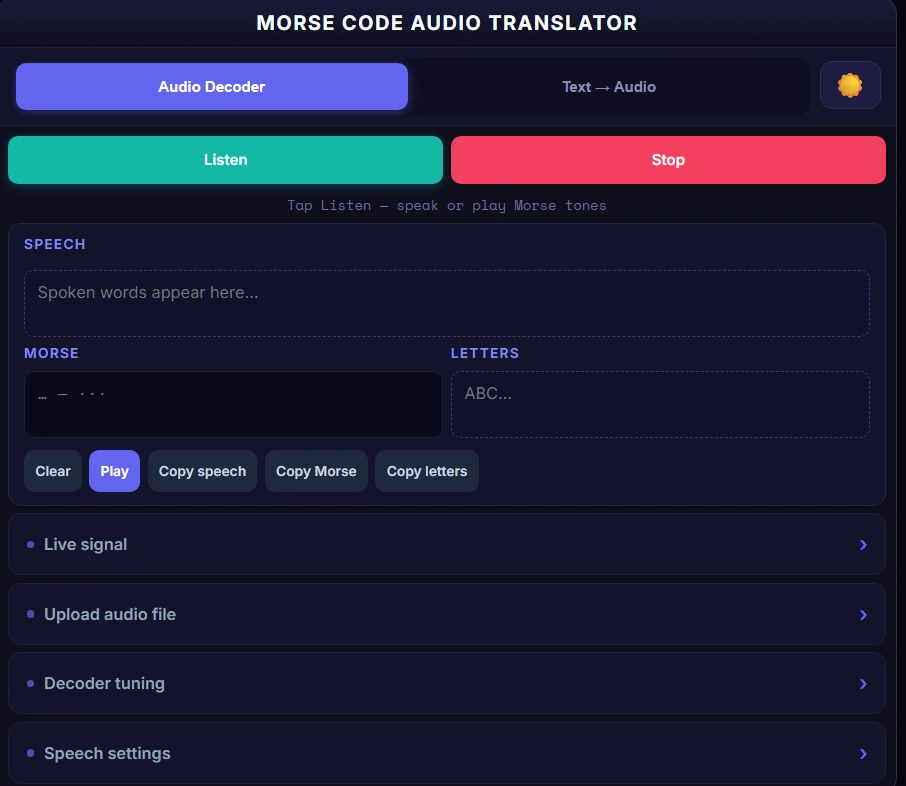
The tool is particularly useful for:
If you’re new to Morse communication, you may want to review the International Morse Code chart to understand how letters, numbers, and punctuation are represented using dots and dashes.
For additional practice, exploring common Morse code words can help improve recognition speed and overall decoding accuracy.
Not all Morse code decoders offer the same capabilities. Many online tools focus only on basic text conversion or support a limited range of audio formats. This tool handles real-world Morse decoding scenarios while remaining simple enough for beginners.
Decode Morse Audio Online for Free
The decoder works directly in your browser, allowing you to analyze Morse code audio without installing software. Simply upload a supported audio file or use live audio input to begin decoding useful for quick signal analysis, Morse code learning, and field testing.
Works with WAV, MP3, and OGG Files
Different Morse recordings are stored in different audio formats. This tool supports:
WAV files typically provide the highest decoding accuracy because they preserve signal details without compression artifacts. MP3 and OGG files can also be decoded successfully when the Morse tone remains clear and consistent.
No Software Installation Required
Many Morse decoders require software downloads, configuration steps, or platform-specific installations. This decoder eliminates those barriers by running directly in your browser.
Benefits include:
Built for Beginners, Radio Operators, and Developers
Beginners: Practice Morse code recognition and verify decoded messages instantly.
Amateur Radio Operators: Analyze CW recordings, training files, and Morse transmissions more efficiently.
Developers and Makers: Generate Morse audio, test embedded systems, validate signal processing projects, and experiment with Raspberry Pi or Python-based Morse applications.
Because the tool combines audio decoding and audio generation in one interface, it serves as both a learning platform and a practical Morse communication utility. For text based Morse translation, use our free Morse code translator. To decode Morse from images, try the Morse code image translator.
Feature | Manual Decoding | Morse Code Audio Decoder |
|---|---|---|
Learning Curve | High | Low |
Speed | Slower | Faster |
Long Recordings | Difficult | Easy |
Live Monitoring | Challenging | Supported |
Accuracy for Beginners | Lower | Higher |
WAV/MP3/OGG Support | No | Yes |
Adaptive Speed Detection | No | Yes |
Text Export | Manual | Instant |
Real-Time Decoding | Limited | Yes |
Signal Verification | Manual | Automatic |
Decoding Morse code audio no longer requires specialized software or years of listening practice. This Morse Code Audio translate automatically analyzes Morse timing, detects dots and dashes, and converts them into readable text. Whether you’re working with a radio recording, a training file, or a generated Morse signal, the process only takes a few steps.
Unlike basic Morse translators that only convert text into dots and dashes, this tool is designed to interpret real audio signals. It can process uploaded recordings and live audio input while adapting to different Morse speeds and transmission styles.
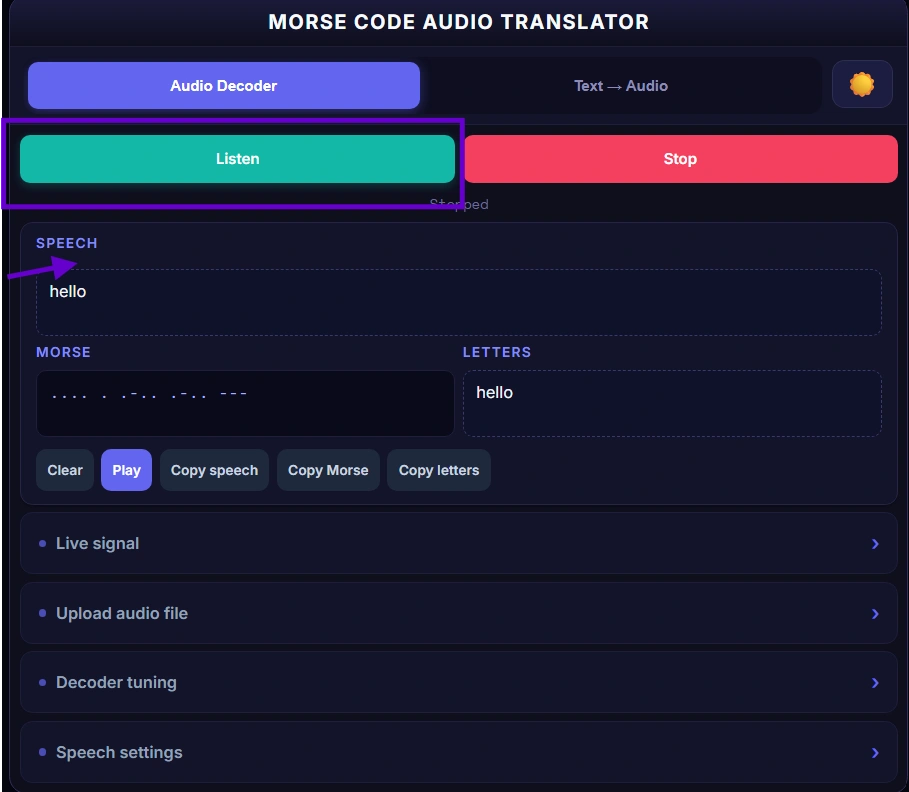
Step | Action |
|---|---|
1 | Upload a WAV, MP3, or OGG file |
2 | Or use live microphone input |
3 | The decoder detects dots and dashes |
4 | Morse code is converted into text |
5 | Review and copy the decoded message |
One of the most useful features of this tool is its ability to listen to live Morse code signals through your device’s microphone.
Instead of uploading a recording, you can:
As the signal plays, the decoder monitors the incoming audio stream, detects Morse timing patterns, and begins building the corresponding Morse sequence in real time.
This feature is especially helpful for:
If you’re learning Morse rhythm and spacing, reviewing the Morse alphabet reference can help you better understand how individual characters are formed.
If you already have a recording, simply upload it to the decoder.
Supported formats include:
The decoder will process the uploaded file, identify Morse tones, and attempt to reconstruct the original message.
Common upload sources include:
For best results, use recordings that contain a clear Morse tone with minimal background noise.
Recommended Audio Quality
Format | Recommended | Notes |
|---|---|---|
WAV | ✓ Best | Highest decoding accuracy |
OGG | ✓ Good | Works well with clean signals |
MP3 | ✓ Good | May introduce compression artifacts |
Although MP3 files generally decode successfully, WAV recordings preserve the most signal detail and typically provide the most accurate results.
One of the biggest challenges in Morse decoding is speed variation.
Some recordings are transmitted at:
Traditional decoders often require manual speed configuration before decoding can begin. This Morse Code Audio translator uses adaptive speed detection to estimate transmission speed automatically.
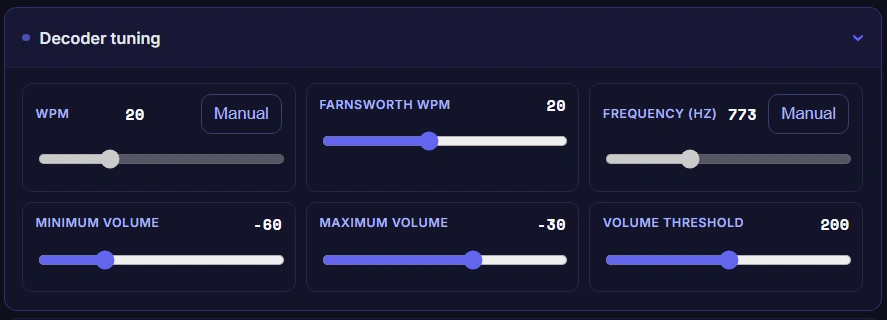
The decoder analyzes:
This allows it to interpret Morse signals even when the sender uses a speed different from the one originally expected.
Adaptive detection is particularly useful when decoding:
Because timing is one of the most important aspects of Morse communication, understanding basic Morse spacing can improve both manual and automated decoding accuracy. If you’re unfamiliar with Morse timing rules, the International Morse Code chart provides a useful reference.
After detecting the Morse signal, the decoder converts each Morse sequence into its corresponding character.
For example:
The decoding process follows several stages:
- Detect Morse tones within the audio signal.
- Measure timing intervals.
- Identify dots and dashes.
- Determine character boundaries.
- Reconstruct words and sentences.
- Display the final text output.
The decoded output can then be:
This process eliminates much of the manual effort involved in traditional Morse interpretation and makes Morse communication more accessible to beginners.
Start by selecting your Morse audio source.
You can either:
If you’re testing the decoder for the first time, try using a simple signal such as the SOS Morse code signal which is one of the most recognizable Morse patterns in the world.
Once the audio begins processing, the decoder analyzes the waveform and searches for Morse timing patterns.
During this stage, the system identifies:
Accurate timing detection is critical because even small timing differences can change the meaning of a Morse message.
After signal analysis is complete, the detected Morse sequence becomes visible.
Reviewing the Morse output allows you to:
This step is particularly useful when working with noisy recordings or weak radio signals.
Once the message has been decoded successfully, you can copy the resulting text for further use.
Common use cases include:
The ability to quickly move from Morse audio to readable text makes the tool useful for both casual users and experienced operators.
Many Morse decoding tools require software downloads, operating system compatibility checks, or additional configuration before they can be used. This Morse Code Audio Translator takes a different approach by running directly in your browser.
Because decoding happens through a browser-based interface, users can access the tool immediately without dealing with installation files or platform restrictions.
Benefits include:
For users who simply want to translate Morse code online browser-based tools provide a practical alternative to desktop software.
In addition, browser-based decoding makes it easier to move between Morse learning, signal testing, audio generation, and message verification without switching between multiple applications.
The quality of a Morse code recording has a direct impact on decoding accuracy. While this Morse Code Audio translator can process multiple audio formats, some file types preserve Morse timing and signal clarity better than others.
Understanding the strengths and limitations of each format can help you achieve more reliable decoding results.
Format | Supported | Audio Quality |
|---|---|---|
WAV | Yes | Excellent |
MP3 | Yes | Good |
OGG | Yes | Good |
WAV is generally the preferred format for Morse code decoding because it stores audio with little or no compression.
Unlike compressed formats, WAV files preserve:
These characteristics are critical when decoding Morse code because even small timing changes can affect how dots and dashes are interpreted.
Benefits of WAV recordings include:
If possible, use WAV recordings when working with:
For users practicing Morse recognition, comparing WAV recordings against the Morse alphabet reference can help reinforce proper timing patterns.
MP3 is one of the most common audio formats used online because it significantly reduces file size.
Although MP3 files are supported by this decoder, compression can sometimes introduce artifacts that slightly alter Morse signals.
Potential challenges include:
Fortunately, most clean MP3 recordings still decode successfully.
MP3 works well for:
When recording Morse specifically for decoding purposes, WAV remains the preferred option, but MP3 can still produce reliable results when the source signal is clear.
OGG provides a balance between audio quality and file size.
Many modern applications use OGG because it offers efficient compression while maintaining good audio fidelity.
Benefits include:
OGG recordings can be useful for:
As with any audio format, the best decoding results occur when the recording contains a strong, consistent Morse tone with minimal background interference.
Not all Morse recordings are identical. Differences in frequency, volume, recording quality, and background noise can make decoding more difficult.
That’s why this Morse Code Audio translator includes tuning controls that help improve signal recognition and decoding accuracy.
Rather than treating every recording the same, the decoder can analyze signal characteristics and adapt to different conditions.
This is especially useful when working with:
A signal threshold determines how strong a sound must be before the decoder considers it part of a Morse transmission.
If the threshold is set too low:
If the threshold is set too high:
Proper threshold adjustment helps separate valid Morse tones from unwanted noise.
This becomes particularly important when decoding:
Every Morse recording contains an audio tone that occupies a particular frequency range.
The decoder analyzes these frequencies to locate the Morse signal and distinguish it from surrounding sounds.
Common Morse tones are often found between several hundred and several thousand Hertz, depending on the source.
Frequency recognition helps the decoder:
This is especially valuable when processing amateur radio recordings where multiple signals may be present simultaneously.
Background noise is one of the most common causes of decoding errors.
Noise can originate from:
Noise filtering helps isolate Morse tones and reduce unwanted audio components.
Benefits include:
The cleaner the signal, the easier it becomes for the decoder to identify Morse timing correctly.
Several factors influence Morse decoding accuracy.
For best results:
When testing signals, generating known phrases such as hello in Morse code can help verify that the decoder is functioning correctly.
Consistent signal quality almost always leads to more reliable decoding results.
Why WAV Files Produce the Best Results
WAV is generally the preferred format for Morse code decoding because it stores audio with little or no compression.
Unlike compressed formats, WAV files preserve:
These characteristics are critical when decoding Morse code because even small timing changes can affect how dots and dashes are interpreted.
Benefits of WAV recordings include:
If possible, use WAV recordings when working with:
For users practicing Morse recognition, comparing WAV recordings against the Morse alphabet reference can help reinforce proper timing patterns.
Decoding MP3 Files
MP3 is one of the most common audio formats used online because it significantly reduces file size.
Although MP3 files are supported by this decoder, compression can sometimes introduce artifacts that slightly alter Morse signals.
Potential challenges include:
Fortunately, most clean MP3 recordings still decode successfully.
MP3 works well for:
When recording Morse specifically for decoding purposes, WAV remains the preferred option, but MP3 can still produce reliable results when the source signal is clear.
Using OGG Recordings
OGG provides a balance between audio quality and file size.
Many modern applications use OGG because it offers efficient compression while maintaining good audio fidelity.
Benefits include:
OGG recordings can be useful for:
As with any audio format, the best decoding results occur when the recording contains a strong, consistent Morse tone with minimal background interference.
Even advanced decoders perform best when the source recording is clean and consistent. Following a few best practices can significantly improve decoding accuracy and reduce recognition errors.
Best Results Checklist
Use Clean Single-Tone Recordings
This Morse Code Audio translator performs best when the recording contains a single, clearly defined Morse tone.
Single-tone recordings make it easier to identify:
Complicated audio containing music, speech, or multiple overlapping tones may reduce accuracy.
Whenever possible:
Clean signals provide the decoder with the clearest information to analyze.
Reduce Background Noise
Noise is the enemy of accurate Morse decoding.
Common sources include:
To reduce problems:
Better signal-to-noise ratios typically produce more accurate text output.
Choose WAV for Highest Accuracy
Although WAV, MP3, and OGG are supported, WAV remains the preferred format for Morse decoding.
Because WAV files preserve timing and frequency information more accurately, they often provide:
For important recordings, always choose WAV if available.
Keep Morse Timing Consistent
Morse code relies heavily on timing.
Inconsistent spacing between dots, dashes, letters, and words can make decoding more difficult for both humans and software.
Maintaining a consistent transmission speed helps the decoder accurately interpret:
For learners who want to improve timing consistency, studying common Morse code words can provide useful examples of real Morse patterns used in practice.
If you’re learning Morse code, practicing audio recognition, or testing Morse signals, the following guides may help:
Learn the Morse Alphabet
Explore the complete Morse code chart and character reference:
International Morse Code Chart
Practice Common Morse Words
Improve recognition speed using real Morse words:
Common Morse Code Words
Learn the SOS Distress Signal
Understand one of the most recognized Morse patterns:
SOS Morse Code
Practice Popular Morse Phrases
- Hello in Morse Code
- Hi in Morse Code
- I Love You in Morse Code
- I Miss you in Morse Code
- No in Morse Code
- Happy Birthday in Morse Code
- Be safe in Morse Code
- Help in Morse Code
- Good Morning in Morse Code
- Good bye in Morse Code
Whether you’re analyzing a radio recording, practicing Morse code, testing a Raspberry Pi project, or converting audio into readable text, this Morse Code Audio translator provides everything needed in one place. Upload WAV, MP3, or OGG recordings, listen to live Morse signals, adjust decoding settings, and convert Morse audio into text automatically.
You can also generate Morse code audio, customize WPM and frequency settings, and export WAV or MP3 files for training and testing. Instead of switching between multiple tools, use this complete Morse workflow to decode, generate, verify, and practice Morse code more efficiently. Try the decoder now and start turning Morse audio into readable text within seconds.

Steve Johnson
Founder of AllMorseCode.com and creator of educational Morse code resources used by learners worldwide. Specializes in Morse code translation, signal encoding concepts, communication history, and practical learning methods. Publishes in-depth guides, reference materials, and interactive tools that make Morse code simple, accurate, and accessible for students, amateur radio enthusiasts, emergency preparedness learners, and everyday users.